



Home Blog Page 1683

Mind Map Learning Approach Using SCORM Standards

People learn in different ways.Learning is a complex,  interrelated system of accessing information, getting it into the brain, and processing that information to solve problems or support activities. Understanding learning styles leads to success. Once an individual knows what learning environment works best for him/her and what his/her preferred learning style is, the individual will see how he/she can use the preferred learning style to move information through the learning process and to learn new information more quickly and efficiently, remember new information for a longer period of time, and increase ability to recall the information more quickly and completely for performance, discussion, or test taking.

Mind maps and scorm for course content development

This article presents the mind map approach as one of the learning styles. Mind map is a way of representing information graphically using keywords, links, and key images, allowing a lot more information to be put on a page. Mind map works the way the brain works, which is non linear.

Any idea probably has thousands of links in your mind. Because mind maps are more visual and depict associations between key words, they are much easier to recall than linear notes. Starting from the center of the page rather than top-left corner allows you to work out in all directions. Mind maps are easy to review. Visual quality of mind maps allows you to make key points to stand out easily. Mind map has been used in many fields such as notes, problem solving, planning, and presentations.

Although mind map learning approach is widely accepted, there is still little research on e-learning and teaching using this approach for developing course content. SCORM has become a widely used requirement for e-learning projects. However, there is still a lot of confusion, especially within the instructional design community, regarding what it is and when it should be used. This article presents an experiment in developing course content taking the advantages of one of the most powerful approaches in displaying information visually, in a learning and teaching environment using SCORM standards. The aim of this experiment is to accommodate individual learning styles in an adaptive learning environment that teaches the “C programming language”.
SCORM standard is another aspect this project is using. SCORM nowadays become a widely used requirement for e-learning projects. There is still a lot of confusion, especially within the instructional design community, regarding what it is and when it should be used. SCORM or the Sharable Content Object Reference Model provides a common technical framework for the development of reusable instructional objects for computer and Web-based learning. This paper presents the design and implementation of course content development based on mind map approach using SCORM.

SCORM is a model that describes a standardized way to design and develop learning materials. The greatest advantage of implementing SCORM standard is that it makes it possible to integrate learning objects from different sources in a common environment. SCORM as model describes two main elements a Content Aggregation Model (CAM), which describes the ways in which SCORM materials are organised and packaged so that they can be exchanged between different learning management systems (LMS) and a Run Time Environment (RTE), which provides the means for the learning materials to communicate with the LMS and for the collection of data to track and monitor learners.

CAM in Mind map implementation

The most important thing is how to package together a collection of learning objects, their metadata, and information about how the content is to be delivered to the user.

Developing SCORM Content Package

For developing any content package the following steps should be followed.

1- Define the course root aggregation.

2- Develop a content package which, contain two main principals component must be developed carefully, first all the physical files such as Assets (Assets are any digital objects of media, text, images, sound, web pages or other data can be delivered to a web client), and SCO (SCO is a collection of one or more assets). Second a manifest file, which is a list of all the resources (SCOs and assets), the organisation, sequencing rules, and all of the metadata.

3- Identify the metadata for each SCO and the metadata for the entire content package by indicating the ownership, cost (if any), the technical requirements, and educational purposes.

4- Zip the content package together with the IMS files, which is standard communication specifying data model between LMS and SCO.

5- Test the package in any LMS to ensure it functions the way you had intended.

Mind Map Course Design

The “C programming language” course was developed based on mind map approach as follows:

1 The root aggregation is defined and all the physical files and their links are developed.

2 The course main page is designed based on Mind map approach using only key words and whenever possible images emphasized by color.

3 Starting from the center of the page and moving outwards, making the center a clear and strong visual image.

4 Create the sub-center.

5 Put keywords on lines using lower case and using color and arrows to show links between elements.

The testing tool used in this stage is TestSuite 1.3.3 ST from ADL.

RTE in Mind map implementation
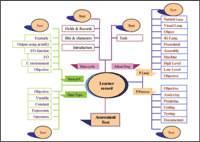
Run time environment describes the LMS responsibility to launch SCOs based requests from the learner and the sequencing rules of the content organization. Therefore, the main requirements in this phase are: to have Application Programme Interface (API), which is a set of functions to achieve the communication between the course content and LMS and facilities to utilise details from manifest file through data model. This data model enables the LMS to track learners’ progress. The steps developed in this phase are as follows:

1. All the physical files in this course have been designed and developed using hyperlink, text, and images such as in. All the course content files have been developed as assets. The nature of the mind map approach requires allowing the learner to jump through the links in the main page. As such, SCOs cannot be implemented due to the following reasons: (1) A SCO is not allowed to contain hyperlinks to other SCOs. (2) A SCO is not allowed to interact with the runtime environment, except through the SCORM API. (3) A SCO is not allowed to create additional windows, unless it can close them reliably when the SCO terminates. (4) A SCO should not contain hyperlinks to resources that May not be available when the SCO is run in different context than the original context [3].
2.The strategy of the course is jumping from section to section through the main page by the links.
3. The manifest file represents the course sequencing and navigation showing the structure of the course organization and all content resources using IMS Simple Sequencing, which is the specification, which describes three models: sequencing definition model, tracking model, and activity state model. Manifest file also represents the navigation model which indicates how the content is presented to the learner by controlling certain user interface devices that the content May wish to provide, such as Continue and Previous.

Because of the nature of the mind map, only the following aspects in  SCORM sequencing definition model and navigation presentation has been implemented:

Sequencing control choice: This indicates that the learner is free to choose any activity in a cluster in any order without restriction, which contains a boolean (True/ False). Therefore False was chosen to prevent the learner from browsing the course through the cluster instead of the map, which is the heart of the mind map approach. • Sequencing control choice exit: This indicates whether a Choice navigation request can target activities that are not descendents of the affected  ctivity, thereby causing the affected activity to terminate. This element contains a Boolean (True/False). The value True indicates that while an activity is active the learner has the ability to trigger Choice navigation requests that targets nondescendent activities. • The Continue and Previous devices have been disabled to enforce the learner to navigate the content object through the map only. The tracking and activity  state model is simply recording progress and have no interest in user preferences or learning styles. Therefore, implementing advanced function such as prerequisite or other pedagogy Hanan Dageez from Libya is a lecturer in Libyan High Institute and university and the head of computer science  department in High Institute. She has a Masters in computer sciences in 1999  from University of Malaya, Malaysia. Currently Hanan is doing her Ph.D research in Education management at University Tun Abdul Razak, Malaysia. concepts are not easy to handle and in some cases, impossible to implement. The course content implementation  This work is part of research work done and Sample RTE 1.3.3 from ADL has been modified and used as LMS to cope with this research. First the course must be uploaded and the prerequisite chapters identified by the administrator from the main menu to choose how many chapters this course contains and then the prerequisite chapters for each chapter will be determined for the course. When a learner logs in into the system and registers for the course the system allows him to view the content by displaying the mind map main page. Through the links the learner reviews the course and by answering the tests and the assessment test tracks progress by recording the chapters he/she have failed to answer their questions correctly. The learner, in this case, has to redo failed chapters with all the prerequisite chapters. Even though the learner quits accidentally and gets back into the module, by clicking on “Learner record”, the list of remaining chapters will appear to remind the learner to finish them for record in  completing the course.
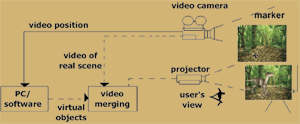
Video Setup for Classroom Learning

Augmented Reality (AR) is part of the growing research area  of Virtual Reality (VR). The term VR, defined as “a computer generated, interactive, three-dimensional environment in which a person is immersed” (Steve Aukstakalnis, David  Blatner, Stephen P. Roth , 1992). As the field of research is growing, it is important for the researchers to enhance learning and data gathering from the environment and provide new ways to obtain knowledge. One way of achieving this is through the usage of Augmented Reality. The augmented reality system generates combinations of view for the user. In simpler definition, it is actually a combination of the real environment and virtual objects, generated to produce a combined output to the viewer. AR enhances the person's perception of the world.

Augmented Reality in medical training

AR has been used in entertainment, military training, medical, engineering design, robotics and tele-robotics, manufacturing and consumer designs for many years prior to its introduction. Fotis Liarokapis, Panos Petridis, Paul Lister and Martin White (2002) have developed “an interactive e-learning AR environ-ment” called Multimedia Augmented Reality Interface for E-Learning (MARIE) in which users can view and interact with 3D virtual objects aided by online instructors. This system uses the head-mounted display, camera, and computer for visual augmented reality to present 3D multimedia information to the learner regardless of gender or age group.

The usage of AR in medical field increases the efficiency especially in the students training area as there is no more the need to make use of real human or animal body to do analysis and surgery trial (Wenzel D., 2004). The same 3D object can be used to train a number of students instead of using one human body to train a group of students. In addition, AR enables students to learn more and become skilled in the surgery as the 3D image can be recreated and the surgery can be repeated whenever errors are made (Fuhrmann, 2001). AR is capable of creating end result of any actions taken in an artificial body similar to a real body. Students and trainee surgeons get the opportunity to learn from the consequences of each of their actions during surgery through AR.

While virtual reality is being widely explored by the computer scientists, Augmented Reality that improves the human vision and perception is becoming the focus of many researchers around the world. While virtual reality is computer generation of immersible environments based on real world,  Augmented Reality is integration of graphics, text, sound, images and force feedback with real environment.  Augmented reality can be the next wave that will revolutionise teaching and learning through real time interaction. This article discusses the use of AR to augment teaching and learning in classroom by presenting a simple and cost effective AR setup that merges real scenes with virtual scene or objects.

Experimental setup

A topic on recreation of dinosaurs using DNA extracted from amber was selected to this experimental study. Storyboard was created to depict the sequence of extraction of DNA, injection into an egg and recreation of dinosaurs. 3D models were created to be merged with scenes inside classroom for interaction purposes based on the storyboard.

Virtual objects were developed

in the format of 3D using 3DS Max software. The created 3D models of dinosaurs were converted to VRML format. In order for the AR software to recognise the model, a marker was assigned to each model. Each marker had a pattern, which was unique to distinguish the recognition of virtual objects assigned to them. Markers were assigned to the models using the AR software.

The setup
 The setup has three steps as explained below.
 Setup digital video camera and calibrate.

The digital video camera is setup in front of the classroom. The equipment had to be set in front of the classroom in order to connect the laptop to the projector, which is already mounted in front.

Place the marker in the desired environment.

The AR markers were placed in at a location where camera is calibrated to recognise the markers to merge virtual models to augment.

Capture real scene and merge with virtual image.

Markers were placed in different locations of the classroom where the digital camera can be moved to capture the scene and the marker. AR software merged the real scene with virtual objects, which are the 3D models of dinosaurs to form augmented scene which is displayed in the monitor.This is projected on to the screen for the audience in the classroom to view.

This type of AR setting was chosen, as it is cost effective compared to using the head-mounted devices. A video camera was setup to capture the real world scenario. The video camera relayed the real environment captured. It passed through the graphics system using a Firewire card and an IEEE 394 cable connected to the video camera. Alternatively, if there is no Firewire card available, a video-capture card with attached Firewire port is also usable. The scenes were merged using AR Toolkit. A few different versions of AR software were used for these experiments. The augmented result was then projected as the output on the screen.

20 students who attended this experimental study were very excited to see the real time augmented scenes in the classroom. They interacted with markers by moving them to different location within the camera view where the virtual models were recognised. In this case, a projector is connected up from the laptop and the whole class gets to view what is displayed. However, the following limitations were found while using this setup in the classroom.

Low Latency

Low latency is the image registration error caused by system delays. The low latency problem can be solved by predicting the future motion or through careful system design (Azuma et al, 2001). However, this requires a thorough knowledge of the application domain to be incorporated as part of the AR system. In this case the topic for teaching selected must be analysed to create models, which are appropriate to be used with fixed AR setting. This careful planning and designing of the virtual models with the consideration of the real scenes in perspective will provide effective and enhanced learning environment for the students.

Limitation in the degree of movement and interaction

Tracking using markers and fixed camera method is currently limited in providing the degree of freedom of movement to the instructor. Camera has to be moved every time the markers are moved in order to be recognised to display the virtual models. The camera needs to be calibrated to recognise the markers when the markers are moved. Good results were obtained when the markers were fixed on the wall with fixed camera position. However, when the students no more the need to make use of real human or animal body to do analysis and surgery trial (Wenzel D., 2004). The same 3D object can be used to train a number of students instead of using one human body to train a group of students. In addition, AR enables students to learn more and become skilled in the surgery as the 3D image can be recreated and the surgery can be repeated whenever errors are made (Fuhrmann, 2001). AR is capable of creating end result of any actions taken in an artificial body similar to a real body. Students and trainee surgeons get the opportunity to learn from the consequences of each of their actions during surgery through AR.

Experimental setup

A topic on recreation of dinosaurs using DNA extracted from amber was selected to this experimental study. Storyboard was created to depict the sequence of extraction of DNA, injection into an egg and recreation of dinosaurs. 3D models were created to be merged with scenes inside classroom for interaction purposes based on the storyboard.
Virtual objects were developed in the format of 3D using 3DS Max software. The created 3D models of dinosaurs were converted to
VRML format. In order for the AR software to recognise the model, a marker was assigned to each model. Each marker had a pattern, which was unique to distinguish the recognition of virtual objects assigned to them. Markers were assigned to the models using the AR software.

 The setup

 The setup has three steps as explained below.

 Setup digital video camera and calibrate.

 The digital video camera is setup in front of the classroom. The equipment had to be set in front of the classroom in order to connect the laptop to the projector, which is already mounted in front.

 Place the marker in the desired environment.

 The AR markers were placed in at a location where camera is cali.
want to hold the markers to interact, they had to hold the markers still in order to be captured and recognised to generate augmented scene. One way to solve the above problem might be developing teaching material that caters for fixed markers and camera in the classroom.

The virtual models developed as part of Augmented Reality can be used to train students to interact with virtual objects and real scene that allow them to visualise and understand certain topics in the subject taught in classroom better

Key lessons

In conclusion, the AR setup proposed for classroom in this article is feasible, cost effective, easy to setup and maintain. The virtual models  developed can be used to train students to interact with virtual objects and real scene that allow them to visualise and understand certain topics in the subject taught in classroom better.
However, registration of virtual object with real scene is one of the major challenges when a student wants to interact by moving the markers in the classroom. Camera is unable to capture the marker accurately when the marker is moved or the camera is moved. This caused the recalibration of the camera, which made the recognition of the marker to be slow and time consuming. The interaction with virtual models and real scene is limited due to fixed markers and fixed camera position. The image needs to be fixed to still surface in order to get good results. Planning and designing of the teaching material that can take advantage of fixed camera and marker position may solve the problem.
Future work will focus on refined techniques and development of teaching material that can be tested with this AR setup and measurement of the outcome of learning using Augmented Reality. 

Refrences

Fotis Liarokapis, Panos Petridis, Paul Lister, Martin White (2002), “Multimedia Augmented Reality Interface for E-Learning (MARIE)”, World Transactions on Engineering and Technology Education 2002 UICEE Vol.1, No.2,173
Wenzel, D., (2004), “Augmented reality in Medical application”,
http://www.fabuloz5.de/dirk/avr. pdf#search='augmented%20reality%20in%20 medical%20field'.
Fuhrmann, A. L., (2001), “Virtual reality in medical application”,
http://www.bmvit.gv.at/sixcms_upload/media/223/virtual_reality_in_ medical_applications.pdf#search='augmented%20r eality%20in%20medical%20field', Date referred 26 May 2005

Corporate Diary: Feb 2007

project

Hughes to set up 1,000 rural ICT

Kiosks based software development major Hughes Network Systems will set up 1,000 rural information communication and technology (ICT) kiosks within the next three years in India.

However, no mention is made on how much the company is going to invest in this project. But the cost of building a satellite terminal in a village would cost about INR100,000. Broadband satellite is a viable solution for India for popularising distant learning: India has 350 million illiterates and the dropout rate is 87 percent. And broadband satellite is ideal for inclusive growth. The company has signed an agreement with global IT giant Microsoft to offer various kinds of IT services in rural India. Hughes Network Systems has so far invested over $300 million since its entry in India in 1992.

Qualcomm’s wireless dream

Qualcomm recently announced the names of the developers who will participate in its Wireless Reach BREW Application Funding Programme. The company has established a fund of $1 million to encourage the creation of BREW-based wireless applications for segments such as education, government, healthcare, public safety and environment.

The initiative empowers underserved communities through the use of third generation (3G) wireless technologies. This initiative is already empowering communities in countries such as China, India, Indonesia, Mexico, Peru, South Africa and Vietnam. In India, Qualcomm has formed an alliance with the Nasscom Foundation to enable connectivity and provide content based solutions to village resource centres across nine states. As part of the Nasscom Foundation’s Rural Knowledge Network Program, CDMA2000 based wireless Internet connectivity will be deployed in 65 village resource centres.

Tata Tele bags order for Internet connectivity to 1,800 Indian schools

Tata Teleservices Limited has won the Tamil Nadu (Indian state) government’s order to offer Internet connectivity in 1,800 higher secondary schools. In three months time the schools, sizeable number of them located in remote villages will be able to connect to the Internet. While the order size is not large, Tata Tele-services hopes to see some money in the actual usage by the schools. The expected usage charges from each school are around INR750 per month.

practice

Microsoft launches Software4Students plan

Microsoft has announced plans to offer discounted software to Irish students and provide rebates to educational institutions.

The National Centre for Technology Education (NCTE), Union of Students of Ireland and the Combined Higher Education Software Trust (CHEST) have signed an agreement with Microsoft to offer specially priced software to every primary, second and third level student in the country. The Software4Students programme will be made available to the 917,000 students in Ireland, providing discounts on all Microsoft software including Office, Windows and Encarta. The programme will see schools and third level institutions receive a rebate worth roughly 5 percent of the licence price every time a student purchases software under the agreement.

Moodle users May go an extra-mile with RapideL

RapideL, the MS-Word based e-learning content authoring solution developed by Brainvisa is now compatible with Moodle! Brainvisa, the learning solutions provider in India, has succeeded in seamlessly integrating RapideL with Moodle, which will spell boon to the approximately 4.9 million Moodle user base worldwide. RapideL enables rapid development of instructionally sound, flash e-learning courses at less than 60% of conventional development cost. Moodle users can now develop courseware from RapideL and can directly integrate the output into Moodle and also host and track their instructionally sound, flash e-learning courses on this open source content management system.

RapideL enables Instructional Designers and SMEs to author AICC/SCORM compliant content from the basic MS-Word authoring interface. RapideL comes with inbuilt robust project management capabilities such as online review mechanisms, issue tracking and the ability to publish web versions. It promotes collaborative development over the network/ Web while also working as a standalone tool without multiple installations. It allows publishing with track changes and support for language localisation.

Microsoft awarded communities for helping people with learning disabilities

The software giant, Microsoft has awarded community groups to help people with learning disabilities use computers and improve their IT skills.Microsoft has givenMicrosoft’s Office software to    communities across the United Kingdom to help physically and mental disabilities through Microsoft’s annual Community

Learning  Awards. Microsoft’s global giving initiative, a scheme is aimed to eliminate technology illiteracy supported by a long-term investment of cash and software. The award scheme is supported by Citizens Online, which is hoped to IT training through supporting informal training projects that introduce ICT to  disadvantaged young people and
adults. The awards have gone to a range of charities, including a project in Northamptonshire which helps people with autism learn the necessary IT skills to enter the workplace and Sense Scotland who  ave used the award to buy new
equipment. RFID e-learning tool is efficient and cost-effective An e-learning product which aims to help users understand the different  aspects of radio frequency identification (RFID) implementation has been developed. OTA  raining has unveiled RFID on the Web, which is designed to assist people who  eed to be trained and certified in the use of RFID. The  ompany has already produced the RFID+ Exam Cram guide, which allows self learning and makes information for training purposes available. In addition to creating an  accessible” product, OTA Training operates with the sole intention of assisting
companies in implanting RFID systems effectively and successfully.  educational material, content and  ervices in seven European countries like Netherlands, Sweden, the United  Kingdom, Germany, Belgium, Austria,
and Hungary. Oracle University offers e-  usiness Certification course Oracle University introduces its e- Business Suite certification course to strengthen the credentials of Oracle professionals and help them provide better service to customers. The Oracle University has introduced e-Business Suite 11i Applications Certification programme to provide better service to its customers. The application is based  n the version 11i of Oracle EBusiness
Suite and Oracle University E-Business Suite curriculum, which may need series of online and proctored examinations.  Intel honours teachers, students
Intel India along with the Navodaya Vidyalaya Samiti (NVS) has honored students, teachers, and schools trained through the Intel® Teach program under a joint initiative launched by the Department of  Education and Intel. Under the Intel   World Ahead Program, Intel Teach is a worldwide initiative to help classroom teachers learn how best to use technology to improve teaching and   earning. NVS with support from Intel, conducted a state level joint competition, and received over 440 entries from across the country. Some innovative projects showcased by winning teachers and students
include creation of an interesting software which contains all possible questions for students appearing in exams, report on how laws of motion can be practically applicable in daily  routine, detailed study on the impact of radioactive elements like radium and uranium in curing deadly diseases.

Preparing for a Knowledge Network

What are the factors that shape the effective adoption of innovations in  education technologies to particular local situations? How to scale-up  promising innovations in ICT in education from a near  erfect ‘pilot’ environment in which they were conceived to the striking realities in the vast majority of schools? Are teachers’ capabilities and effective pedagogy the most  crucial contextual variables that shape the effectiveness of an innovation?  Questions abound, so does the efforts to find out viable solutions to the many
challenges that confront a seamless integration of ICTs in education. The Digital Learning Asia Conference and Exhibition (6-8 February, 2007) at Putrajaya,
Malaysia, a part of eAsia 2007 Conference, is an initiative towards providing a platform for collaborative learning, knowledge networking and strategising among innovators and practitioners in ICT in education in schools, universities and lifelong learning for communities. The conference, second in the series of regional forums organised by CSDMS is being hosted by the Ministry of Energy, Water and Communications, Malaysia and is supported by key government organisations and International thought leaders in Asia and outside.While most countries in Asia are struggling to close the existing divides – digital  andeducational, countries that have adopted ICT-enabled education are  evaluating their interventions and strategising for the most effective processes for a sustainable ICT invention for improving the quality and reach in  ducation. The Digital Learning conference is aimed at providing an opportunity to stakeholders to share practical experience of ICT use in education in geographically and culturally diverse regions. The knowledge networking opportunities provided through structured sessions and discussions, and informal networking spaces in the conference, are aimed at bringing businesses and the knowledge base together and connecting the stakeholders to catalyse
collaboration and partnerships that are mutually beneficial. While innovators will showcase their products and practices and get a informed feedback from the practitioners and users of their products, donors and investors may get to look at some of the programmes and researches that are currently in practice and require support for deepening the process, field testing of experiments and up-scaling and expansion of operations. In this special issue on the learning opportunities in Digital Asia, we have covered some experiments and researches in this sector. The conference is an extension of the knowledge  sharing and networking space that we provide though this publication. While in this issue we continue our focus on Asian countries, Malaysia in particular, as the Digital Learning magazine and Digital Learning Asia 2007 Conference takes a step further in bridging the knowledge gap between decision-makers and practitioners and promotes dialogues, new alliances, inter-personal networks, and cross-sectoral links so that “useful knowledge” is shared and channeled to develop “best management practices” and practical decision support in ICT in education. We invite you to join and expand this knowledge network. Happy Reading!

world

UNESCO launches teacher-training programme in Africa

UNESCO has launched a high-priority ‘Initiative on Teacher Training’ in sub-Saharan Africa. This initiative will assist the continent’s 46 sub-Saharan countries in restructuring national teacher policies and teacher education.

The main of the training programme is to improve the quality of teaching across the continent. In this initiative, 17 countries are participating, including Angola, Burkina Faso, Burundi, Cape Verde, Central African Republic, Chad, Congo, Democratic Republic of the Congo, Ethiopia, Ghana, Guinea, Madagascar, Niger, Nigeria, Sierra Leone, United Republic of Tanzania, and Zambia. TTISSA will link and create synergies from the other core Initiatives, the Literacy Initiative for Empowerment (LIFE) and the Global Initiative on Education and HIV and AIDS (EDUCAIDS).

British Council launches training programme in UAE schools

British Council has launched the project, which is aimed to introduce effective use of ICT in schools in UAE. British Council is to bring together teachers and GGC & UK policymakers to introduce ICT.

The British Council has completed its first teacher-training programme for UAE national schools for vision impaired. British Council launched this training programme with the support of Ministries of Education.  British Council has collaborated with UK education consultants to provide training on ICT tools for education, including e-languages and Global Gateway. The British Council is also working on the ICT in Schools project in co-operation with all the Education Zones in the UAE.

The ICT training workshop is aimed to increase the skills of teachers in the use of ICT in the classroom and to develop the level of confidence in the use of online tools for international collaboration in education.

Australia makes easy e-learning for people

The Department of Industry, Tourism and Resources (DITR) of Australia is making e-Learning more impressive for staff members of Australia.

DITR is planning to implement e-learning this year for 300 staff in its e-business division. The system will include office, management and IT employees. DITR has asked the government for the supply, implementation and maintenance of an online training and education system, as well as an online reference library and help material. The e-learning system would be accessible at work and from home, and deliver reports on its usage.

e-Education Development gets a boost

Azure Technologies and the Department of Technical Education signed a contract agreement worth $2.4 million, marking a new milestone in e-education development in Brunei.

The agreement was inked for the supply, reengineering, analysis, design, delivery, installation, integration, testing, deployment; training, commissioning and maintenance of software and hardware for the implementation of an integrated Web-based technical and vocational education student information system for the Department of Technical Education at the Ministry of Education.

National Development Plans boosts ICT in Irish schools

Schools of Ireland will receive a technology boost under the National Development Plan 2007-2013. The new investment is designed to develop an e-learning culture in schools.
The Ministry of Education will follow this plan by implementing ICT skills into schools. The Government is planning to invest EUR25 million to buy hardware for teaching new and revised technology subjects. Under that plan approximately 500 schools will receive funding, which would be used to provide hardware such as PCs, laptops, printers, digital scanners and data projectors. The National Centre for Technology in Education (NCTE) has joined with the Union of Students in Ireland and the Combined Higher Education Software Trust in signing an agreement with Microsoft to offer specially-priced software to every primary, second and third level student in the country. The Software4Students programme will make discounts on all Microsoft software available to 917,000 students.

Patent Office to re-examine Blackboard learning patent

The United States patent office has ordered a re-examination of an “e-learning” patent owned by Blackboard Inc. The Software Freedom Law Center (SFLC) had asked for the review on behalf of three open source software projects Sakai, Moodle and Atutor.

The Patent Office said that prior art cited by the SFLC raised questions about the patent. It was reported earlier that Blackboard had taken legal action against Desire2Learn Inc. This firm has also asked the patent office to re-examine Blackboard’s patent. The re-examination will take two years.

e-Academy for companies from   MyKnowledgeMap MyKnowledgeMap (MKM), United Kingdom’s leading supplier of infrastructure systems for national skill academies has introduced a version of its e-Academy system enabling companies to manage staff skills and development needs ranging from day-to-day productivity to discovering and achieving relevant qualifications.

Company Academy supports the management of Internal courses. Designed to run over an Intranet, or provided as a hosted solution, it can be provided as an empty infrastructure, ready for an organisation to populate with its own material. Alternatively, it is available with various content packs and can be fully branded to complement the user organisation’s house style.

9.7 million dollar invested in tertiary education

The New Zealand government is investing $9.7 million in 11 projects fostering innovation in tertiary education. The new projects offered funding in the 2007-08 financial year are run by universities or institutes of technology and polytechnics. The projects include development of a Biomolecular Interaction Centre in Canterbury, implementation of e-learning guidelines across the tertiary sector, and establishment of a National Energy Research Institute. The new funding comes on top of the $30 million previously allocated to 34 projects through the TEC’s Innovation and Development Fund (IDF) over the past three years.

New software will help children design their own games and aid learning

Pioneering software that enables children to design their own computer games could significantly improve the teaching of literacy, design and ICT skills in schools. A new project at Heriot-Watt University in United Kingdom aims to produce “Adventure Author”The objective is to show thatcomputer games, as well as being fun, offer a great way of motivating pupils to learn. They can develop their  reativity, and in many cases, generate better results than conventional teaching methods. The 27-month research project “Supporting Creativity in Computer Game Authoring” is due to run untilSeptember 2008. Adventure Author will allow 10-14 year olds to design and build 3D, interactive fantasybased computer games, which will involve developing characters, writing dialogue, plot-structuring and visual design, as well as dealing with technical programming issues and testing/evaluating the games.
Cisco targets emerging communication markets
Cisco announced that it will present two Cisco TelePresence systems each  to the governments of five nations in the emerging markets as a means to  improve communications andcollaboration within and among those countries by harnessing the ultra-high quality, two-way video and audio  capabilities of the TelePresence solution. The participating countries are Egypt, Jordan, Lebanon, Turkey and the United Arab Emirates. Cisco expects to have the  TelePresence systems in all five countries within six months. Cisco estimates that its total contribution will be approximately $6 million. This will include the TelePresence systems, their planning, design and installation and a year’s worth of support services costs.

Study finds open source key to European ICT competitiveness
A new study on the economic impact of Free/Libre Open Source Software (FLOSS) on the European information and communication technologies  (ICT) sector has found that it could increase Europe’s competitiveness.  ’Given Europe’s historically lower ability to create new software  businesses compared to the US, due to restricted venture capital and risk tolerance, the high share of European  FLOSS developers provides a unique opportunity to create new software businesses and reach towards the Lisbon goals of making Europe the  most competitive knowledge economy by 2010,’ states the report, which was requested by the European Commission’s Enterprise DG

asia

Vietnam’s first Mobile Internet library launched

Vietnam’s first mobile Internet library has been launched to serve rural and suburban areas.The library will have a multimedia room with a computer network, CD-ROMs, 1,500 scientific documentaries, special documentaries for the blind, and others. Korea based LG Electronics Corp., has granted US$85,000 to the library. The library is especially meant to serve people, youth without any charges.

Computers with home-grown CPU debut on Chinese market

The first batch of 80 computers powered by home-grown Chinese CPUs are undergoing user tests,The computer, which uses a Linux operating system, comes with a 40-gigabyte hard drive and 256 megabytes of memory. It costs 1,599 yuan (about 200 U.S. dollars), and users have to buy the monitor, keyboard and mouse separately.

China started CPU research and development in 2001, and the first chip, Godson I, came out in September 2002, bringing the country’s microprocessor industry a step closer to the world leading manufacturers in the United States and Japan. China has since developed three more generations of the Godsongenerations of the Godson — Godson II B, Godson II C and Godson II E. The latter models triple the computing speed of the previous ones.

US commits $100m for Pak  education
Pakistan and the US announced an elaborate programme to promote education at all levels in Pakistan with the US committing another $100 million in 2007 in addition to $200 million already provided. The seven points to expand educational opportunities for the people of Pakistan include: teacher training programmes; promotion of teacher, student and faculty exchanges; improvement of secondary-level science and math studies; administrative capacitybuilding, including school infrastructure; vocational/ workforce education and training to meet Pakistan’s labor needs; public/private sector partnerships; and the establishment of linkages between the higher education academic and research institutions of ur two countries and training of Pakistani academics in US institutions.

Majority of Sri Lanka’s teachers
lack computer literacy! The Ministry of Education says a new government survey shows that only a third of the teachers or (32.5 percent) in Sri Lanka are computer literate. Goverment hopes to establish 35 centers that will teach ICT and English literacy to teachers. The preliminary report of the Census on Computer Literacy of Teachers conducted among, government schools approved private schools and Pirivenas shows that Sri Lanka’s computer literacy among teachers varying within 30 to 40 percent across districts. Ministry of Education say literacy in English is also a factor contributing to teachers’ literacy in ICT where only 53.7 percent of teachers in schools and Pirivenas or temple based schools have the ability to read and understand documents written in English. Of the 200,000 teachers, 28 percent are graduates, but they are not computer literate. From the  facilities related to ICT, only 76 percent of schools and Pirivenas have electricity, 26.2 percent havetelecommunication facilities and  less than ten percent have internet facilities. The ministry hasalready given 100 computer  laboratories that run on solar energyto schools without electricity, and 500  are scheduled to be built in 2007.

MALAYSIA

Southern academic centres network to share resources

Viet Nam National University in HCM City and the city People’ s Committee are working on a project to link up academic institutions in the south for the purpose of improving information and resource exchange. The Malaysia-based Multimedia University and the FSBM group will support the project Development of Integrated ICT Infrastructure among Universities, Colleges, Research Institutions and Academic Centres in the South, whose feasibility study is estimated to cost US$3 million.

MDeC promotes graduates as technopreneurs

Multimedia Development Corporation (MDeC) is promoting the job of a technopreneur as a career choice among the local information and communication technology (ICT) graduates. This is because Malaysia still lacks technopreneurs coming to the mainstream business environment. The move is part of MDeC’s effort to encourage local ICT graduates to get involved in the ICT business field.

Egypt seeks Malaysian firms’ involvement in ICT development

Egypt is seeking involvement of Malaysian companies in its large information communication technology (ICT) development projects. Many Egyptian firms had investments in enterprise resource planning (ERP), e-government and automation projects in several
African nations and other Arab countries, urging Malaysian firms to engage in knowledge and know-how transfer.

National Education Blueprint 2006-2010

The National Education Blueprint 2006-2010 outlines six strategies to make national schools premier schools and the people’s preferred choice. The blueprint, which was launched by Prime Minister Datuk Seri Abdullah Ahmad Badawi at the Putrajaya International Convention Centre, aims to develop the nation’s people through education irrespective of race or socio-economic background. Its main agenda is to develop national schools as the mainstream of education with the majority of students attending them.The blueprint, which covers educational development over the same period as the Ninth Malaysia Plan (2006-2010), encompasses three main aspects

Malaysian Smart Portals Expanding Malaysian Study Opportunities

Malaysia, located in South  East Asia, is a testimony to  the world of what it is able to offer academically. Malaysia has grown tremendously in all spheres of life and especially in education sector, it has become a more developed country over last two decades. Considering the pace of the information that would be required by the learning and teaching community in Malaysia, a number of conducive and interactive learning environments in the look of smart, comprehensive e-learning portals have been actively catering the needs of both the learning and teaching community.

Which college is the best? Am I doing the right course? Which university is tops for engineering programmes?” Lingering questions like these are enough to cause sleepless nights and loss of appetite. With over 650 private higher educational institutions in Malaysia, choosing one to go to is never an easy task. Study Malaysia Online sited at http://www.StudyMalaysia.com is a comprehensive and informative educational website that complements well to the efforts carried out by the Malaysian government to promote study opportunities in Malaysia. It provides comprehensive information on various higher educational institutions (private colleges, private universities, public universities and polytechnics), the courses they offer, education financing, updated news on education, significant individuals in the education industry as well as other valuable information on study opportunities for local and foreign students.

Students can obtain the very latest and up-to-date information about the various private schools, colleges, universities, public universities, polytechnics and professional bodies in Malaysia, as well as check out the courses/programmes offered by these schools/higher institutions of learning. Other pertinent sections in the website are profiles of Malaysian institutions, Student's Hotspots which include Event Calendar, Career Guide, On Focus, News, Scholarship, Students' Views and Study Forum.

StudyMalaysia.com is the site strictly dedicated to Malaysian approved educational institutions, which promotes the Malaysian Brand to the world education market.My StudyMalaysia gives one access to a more personalised education with additional features to make this site your valuable resource for educational information.

KakakTua.com is an e-learning web portal developed to help students revise for their exams in a fun and effective manner via the Internet. The aim is to help students find an enjoyable method of learning and at the same time achieve top study grades.

At the core of the site is the Learning Centre, where students can practise thousands and thousands of revision questions and even submit essays for marking by our online teachers. The customised navigation system allows students to revise according to topics, focusing on specific weak areas and levels or practise simulated examination papers. It has developed an intelligent assessment system, which not only gives immediate feedback to the student, just like a classroom environment, but also allows students to track their performance on every subject. This helps students to focus on the subjects or topics, which need more improvement, thus revising more effectively. Parents and teachers can also use this tool to monitor their child/student's improvement in each subject.

The Malaysian Students Network Community / Jalinan Komuniti Pelajar Malaysia (http://www.student. com.my/) also keeps the goal to provide an interactive and integrated Smart Portal: one-stop center for Malaysian students.   

People&rsquo:s Access to Knowledge can Transform India

A national drive to ensure access to knowledge and  learning can transform India’s potential for development, lift young Indians to new levels of understanding and competence, and make India one of the leading knowledge societies in the world. This is the central affirmation of the National Knowledge Commission in its 2006 Report to the Nation, released recently. The Report was presented to the Prime Minister, Manmohan Singh, by Commission Chairman Sam Pitroda. This is also marked by the Prime Minister’s inauguration of two national knowledge portals, opening public access to knowledge and ideas on the issues of Water and Energy.

Appointed by the Prime Minister in October 2005 with a three-year mandate, the Commission is assigned to prepare a blueprint for radical improvement of knowledge access, knowledge creation and application, by and for the Indian people. The assignment includes the generation of practical plans for comprehensive improvement of education standards and opportunities at all levels and notably the uplift of vocational knowledge and skills. The Commi-ssion’s initiatives focus especially on youth and children, who comprise 54 per cent of India’s people, and are its vast human resource of talent and potential competence to meet both national and international needs.

The NKC recommendations are wide ranging, taking in their sweep higher education, vocational training, libraries, e-governance, right to education and translations. Each of the recommendations has been crafted to achieve the objective of tapping into India’s ‘enormous’ reservoir of knowledge and prepare the country for the challenges of the 21st century.

According to the Chicago-based chairman of the Commission, ‘While making the recommendations we have been guided by how knowledge will impact the lives of ordinary hardworking people of India. We are conscious that knowledge is about farmers having access to accurate information about water resources, land quality and fertilisers, students having access to schools and colleges of high quality and good libraries, scientists having access to well equipped modern laboratories, industry having access to skilled workforce and people generally having right to information and good governance.’The Report to the Nation highlights key areas where change could significantly improve people’s inclusion and capability in existing and new fields of knowledge use. This would entail reform in education, learning processes, governance, enrichment of knowledge institutions like libraries and centres of research and learning.

A major thrust is proposed in translation across all Indian languages to further knowledge creation and information dissemination. Access to new technologies and services for information provision and the transfer of knowledge is a priority. The commission has already submitted wide-ranging recommendations for action to the Prime Minister, to which the report has now been made public.

Based on a year-long process of consultations with experts and representatives of government, parliament, academia, industry, civil society and the media, the recommendations are based on open and intensive discussion to identify priorities, concerns, and needed action. The Commission Chairman Pitroda expressed the hope that the Report will generate further discussion and debate, so that public participation enriches the Commission’s efforts.

The inauguration of the two national web portals on Water and Energy marks the Commission’s bid to enhance public access to information and knowledge on these two critical development issues. The promotion of web portals on Internet is just one of the Commission’s initiatives to open up knowledge sources and resources for public use.

Evaulating the Web Accessibility of World&rsquo:s Top Ten Universities&rsquo: Home Page

While last numbers of colleges Universities and business organisations around the world are adopting e-learning for learners, the website accessibility is becoming of critical importance.  This article is the result of evaluating the web accessibility of the World's Top Ten Universities' home pages with the World Wide Web Consortium's (W3C) Web Content Accessibility Guidelines (WCAG) 1.0. The analysia of the source code of the individual home page of each selected university was conducted using “Bobby,” a Web-based analysis tool designed to help determine page features that May be inaccessible for students with disabilities. Based on these evaluations, half of the 2006 World's Top Ten Universities' Home Page or five universities of the 2006 Top Ten Universities did not meet all WCAG 1.0, Conformance criteria. There are three universities of the 2006 World's Top Ten Universities' Home Page that meet WCAG 1.0.
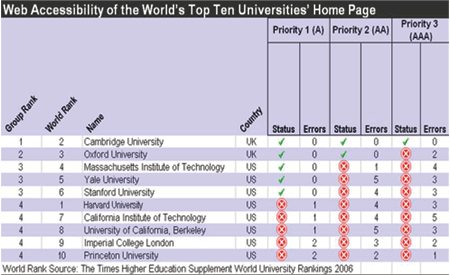
The importance of web accessibility for e-learning is an issue that is gaining incresing attention. There are two main reasons supporting the need of evaluating the 2006 World's Top Ten Universities' Home Page. First is, there is no clear database or collection of e-learning web sites in the global rank. However, the Times Higher Education Supplement has published World University Rankings annually from 2004 to 2006. The third edition was published in October, 2006. The World University Rankings report came from a survey, which focused on many aspects such as research, teaching and international expectations of universities around the world. The second reason is the 2006 World's Top Ten Universities are in countries that declared legislation related to web accessibility. Seven of the 2006 World's Top Ten Universities are in the United State (U.S.) and three universities are in United Kingdom (U.K.). Currently both U.S. and U.K. have policies involving web accessibility.

Using 'Bobby' to evaluate web accessibility

This study focuses on evaluating conformance to accessibility standards based on the Web Content Accessibility Guidelines (WCAG) 1.0 by the automated tools, Bobby. The reason for selecting “Bobby” as the only evaluation tool for this study is because Bobby is a free web accessibility testing tool designed to generate reports of accessibility and encourage compliance with existing accessibility guidelines, including Section 508 of the U.S. Rehabilitation Act and the WCAG 1.0. The usefulness of Bobby confirmed that it reduced time for automatic testing of 14 guidelines, which include 65 checkpoints of WCAG 1.0. In addition, Bobby is free from CAST, the Center for Applied Special Technology. Bobby has been recommended for web developers as a first step to ensure accessible Web page design. Bobby might be used only as a tool for checking completion of three levels of conformance, Priority 1 or “A”, Priority 2 or “AA” and Priority 3 “AAA”.

The evaluation has focussed on determining the strong inaccessible features of the selected web sites of World's Top Ten Universities.

Ranking the web accessibility of university websites

The results discussed in this report are based on an evaluation conducted on October 30, 2006.The home pages of selected universities May have changed since that time. The results of the evaluation can be categorised into four groups as is explained in the figure below.

Cambridge University is the only university whose home page reached the Conformance Level “AAA”. Oxford University is the only university whose home page reached the Conformance Level “AA”. There are three universities, Massachusetts Institute of Technology, Yale University and Stanford University, whose home pages reached the Conformance Level “A”

The first group is the home page that reached the Conformance Level “AAA”: all Priority 1, 2, and 3 checkpoints were satisfied. Cambridge University is the only university in the first group. The second group was the home page that reached the Conformance Level “AA”: all Priority 1 and 2 checkpoints were satisfied. Oxford University is also the only university in the second group. The third group is the home page that reached the Conformance Level “A”: all Priority 1 checkpoints are satisfied. There are three universities in the third group, Massachusetts Institute of Technology, Yale University and Stanford University. The fourth group is the home page that did not reached the Conformance criteria. There are five universities in the fourth group, Harvard University, California Institute of Technology, University of California, Berkeley, Imperial College London and Princeton University.

Common obstacles to web accessibility

Based on the levels of conformance of WCAG 1.0: Priority 1 (A), 2 (AA), and 3 (AAA), the top three mistakes that occurred at each level are discussed below.

The most common mistake for Conformance Level “A” is '1.1 lack of alternative text for all images' on the home pages of both Harvard University and California Institute of Technology. The home page of Princeton University also had similar errors – '12.4: lack of alternative text for all image-type buttons in forms'. The home page of Imperial College London has different points of mistakes regarding the frames: '6.2: each FRAME must reference an HTML file and 12.1: give each frame a title'.

The most common mistake for Conformance Level “AA” includes two checkpoints that are '3.4: use relative sizing and positioning' and '9.3: make sure that event handlers do not require use of a mouse' on the home pages of six universities. The error 3.4: occurred on home pages of Massachusetts Institute of Technology, Yale University, Harvard University, California Institute of Technology, University of California, Berkeley and Imperial College London. The error 9.3: occurred on home pages of Yale University, Stanford University, Harvard University, California Institute of Technology, University of California, Berkeley and Princeton University.

The second common mistake for Conformance Level “AA” include two checkpoints that were '12.4: explicitly associated with controls and their labels with the LABEL element using relative sizing and positioning' and '13.1: Do not use the same link phrase more than once when the links point to different URLs.' on the home pages of five universities. The mistake of 13.1 occurred on home pages of five universities: Harvard University, Yale University, Stanford University, University of California, Berkeley and Imperial College London. The mistake of '12.4: explicitly associate form controls and their labels with the LABEL element used relative sizing and positioning' occurred on home pages of five universities: Yale University, Stanford University, California Institute of Technology, University of California, Berkeley and Princeton University.

The third common mistake for Conformance Level “AAA” is '5.5: provide a summary for tables' on the home pages of five universities. The error 5.5: occurred on home pages of Massachusetts Institute of Technology, Yale University, Harvard University, California Institute of Technology and Imperial College London.
In this new 21st century, large number of college's universities and business organisation around the world are to adopting e-learning for all learners which included students with disabilities. Thus, the standard for e-learning must consider web accessibility issues. This experimental study assumed that the visitors to all universities web sites are primarily the students including the students with disabilities. It also assumes that the home page of universities should be the representative of the universities' web sites. The results from this study validates that the World's Top Ten Universities' Home Pages analysed by Bobby show that the universities from U.K., the Cambridge University easily earned Conformance “AAA”, Oxford University earned Conformance “AA”. Cambridge University is the only university in 2006 that is ranked at the top in the world by peer review score of 100% (O'Leary, 2006). The other three universities from U.S., Massachusetts Institute of Technology, Yale University and Stanford University earned Conformance “A” from the validation.
For future studies, the researcher would like to recommend that the evaluation might gather better result quality by combination of the automatic testing of source codes such as Bobby and conducting usability testing by students with disabilities. The combination of testing approach May bring about a clearer understanding of how people with disabilities interact with the web pages, using assistive technologies. The results of this study indicate that any websites that satisfied check points of Priority 1, 2, and 3 might not be very meaningful or significant. The websites have to become more accessible for anyone, anywhere, at any time.

Suggested resources

For up-to-date information on web accessibility – Web Accessibility Initiative (WAI) at http://www.w3.org/WAI/. For universities' web developers interested in employ techniques of design accessible web content can learn from the Quick Tips to Make Accessible Web Sites by Henry & Popolizio (2006). The Quick Tips on a vinyl business-card-sized reference card, in large print, and in Braille are available at no charge, up to 500 cards. 


Web Content Accessibility Guidelines version 1.0    


  1. Provide equivalent alternatives to auditory and visual content
  2.       

  3. Don't rely on colour alone
  4.             

  5. Use mark-up and style sheets and do so properly
  6.                 

  7. Clarify natural language usage
  8.                     

  9. Create tables that transform gracefully
  10.                         

  11. Ensure that pages featuring new technologies transform gracefully
  12.         

  13. Ensure user control of time-sensitive content changes
  14.             

  15. Ensure direct accessibility of embedded user interfaces
  16.             

  17. Design for device-independence
  18.             

  19. Use interim solutions
  20.             

  21. Use W3C technologies and guidelines
  22.         

  23. Provide context and orientation information
  24.             

  25. Provide clear navigation mechanisms
  26.             

  27. Ensure that documents are clear and simple
  28.         


LATEST NEWS